Projects / A Markdown Editor for Writers
A Markdown Editor for Writers
A local-first, powerful editor, with AI in the margin.
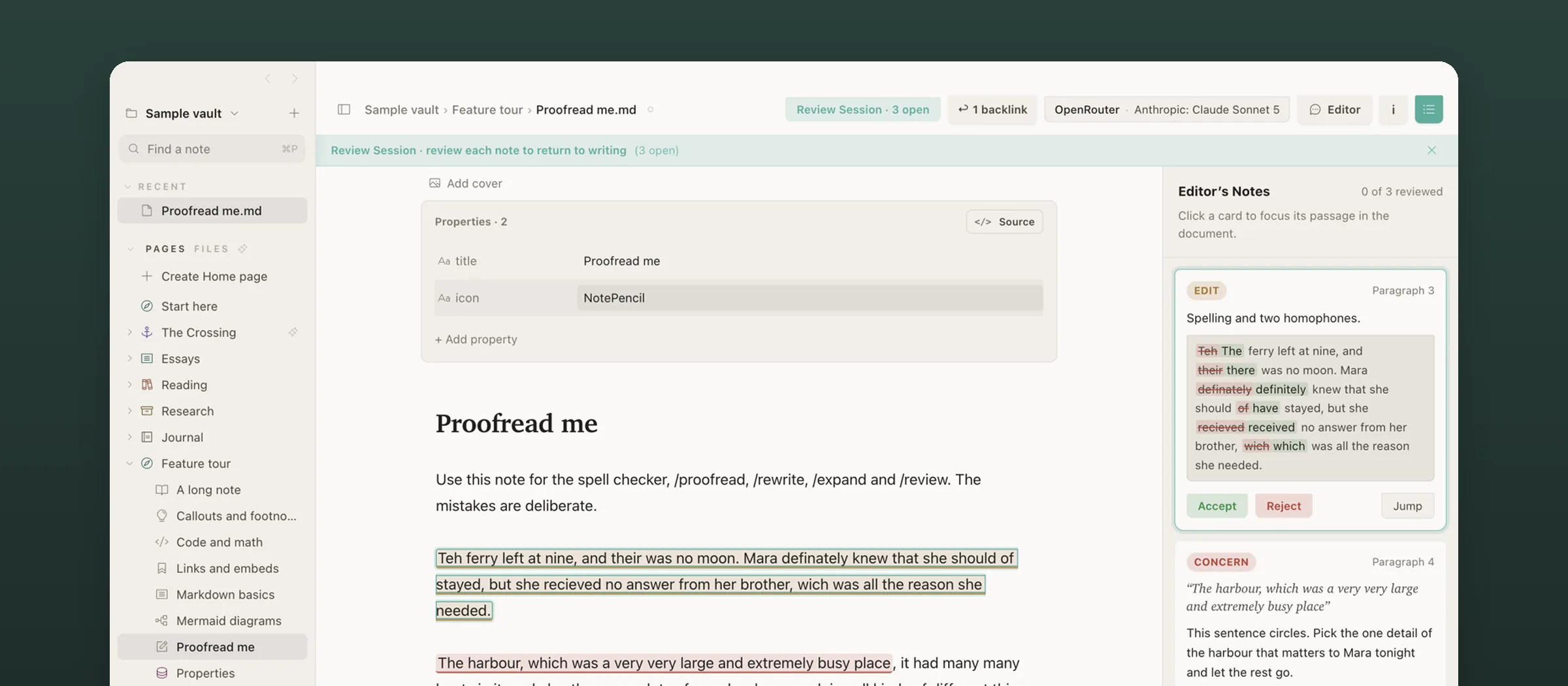
A local-first, powerful Markdown editor for the Mac, with a companion app for iPhone and iPad. AI works like an editor leaving notes on the page, not like a chatbot.
Why I started
I write a lot, and I was a heavy Notion user. The problem? My files were locked in its cloud. Want AI to proofread your notes? That takes a monthly subscription, for a feature that costs a few cents to run. So I moved to Obsidian. The files are local, so you can just point your AI at a folder. The new problem? Editing with AI still meant copying text into a chat window and pasting it back, and the plugins I tried all felt half-baked. I wanted one quiet page where the help comes to the text. So I built one.
What it does
- Renders Markdown in place as you type: no split preview, with serif headings set like a manuscript.
- Works on a vault of plain files, compatible with Obsidian, with
[[wikilinks]], full-text search, backlinks and a history of every note. - Proofreads, rewrites or expands a selection. A full review session leaves anchored editor’s notes in the margin.
- Shows every AI suggestion as a word-level diff, and you accept or reject each change on its own.
- Answers questions from your own notes with citations you can check, and asks before any note is sent to a model.
- Works with cloud models, your own command-line tools, Apple’s on-device model, or a model running on your own machine.
Approach
Built with Electron, React and CodeMirror 6 on the desktop, and a SwiftUI app on iPhone and iPad that hosts the same editor. Most of the work has gone into small things: getting the live preview right, typography, and making AI edits easy to review.
What I’ve learned so far
Designing a good interface for AI-assisted editing turned out to be much harder than I expected.